
For the office and the field
Construction AI for the office and field.
One company number and one workspace for calls, texts, email, project knowledge and team chat. Brody answers the phone, follows up and keeps the next step moving, from the first enquiry to closeout.
The problem
Three jobs keep your people off the jobsite.
Answering the phone, chasing people for answers and keeping records current. Brody takes all three, so your team can build.
- Answering every callCalls answered, routed, booked or messaged, day and night.Handled by Brody
- Chasing people for answersSub starts, certificates, bids and late deliveries, followed up.Handled by Brody
- Keeping records currentDaily reports, photos and notes written to your systems.Handled by Brody
- Building the jobThe work your company is great at.Yours again
The platform
One platform for the office and the field.
A phone system, workflows, knowledge base and team chat in one place, with Brody handling the follow-up.
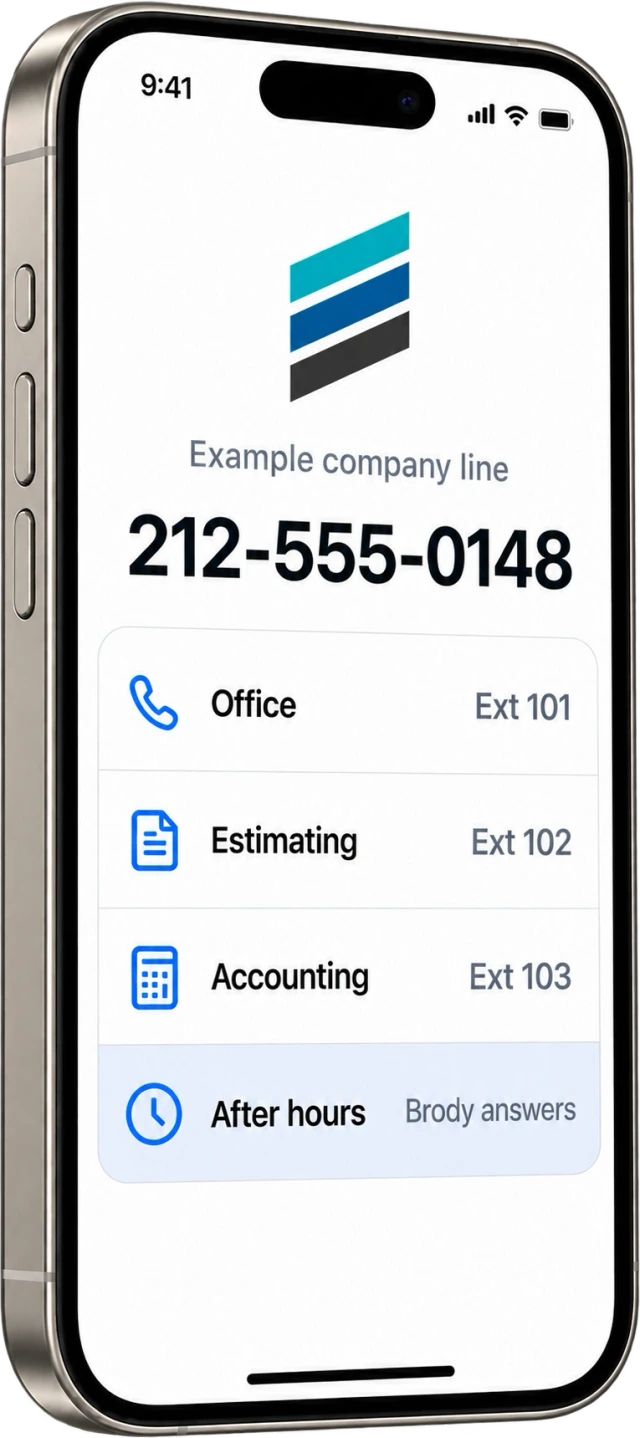
A complete business phone system, with Brody built in.
One company number for the office and the field. Your team takes the calls it wants, and Brody answers, routes and follows up on the rest.
- Extensions, ring groups and queues
- Business texting and voicemail to email
Office phone seats Office phone access included in each paid operating user.
No paid field seats Calls and texts use company allowances.
The work that comes after the call, done end to end.
Bid follow up, certificates, crew dispatch and daily reports run on your rules, from the first call or text to the updated record.
- Bid coverage by trade before bid day
- COIs requested, checked and chased
- Daily reports filed to Procore
Brody follows up before work slips.
Late deliveries, missing reports, expiring insurance and unconfirmed crews. Brody acts on your schedule, then tells your team what is done.
- Company rules written in plain language
- Quiet hours and escalation you set
- Every action logged on the job
Your company’s brain, one question away.
Documents, conversations and connected systems in one knowledge base. Anyone can ask by phone, text or channel and get the answer with its source.
- Specs, drawings, RFIs and schedules
- Answers in the language of the question
- Every answer cites its source
One channel per job, with Brody inside.
Office, field and invited subs coordinate in job channels. Brody reads the dailies, drafts the owner update and posts what he did.
- Channels, direct messages and meetings
- Field members join by plain text
- Drafts wait for your approval
Custom workflows
Describe the process once. Brody runs it every time.
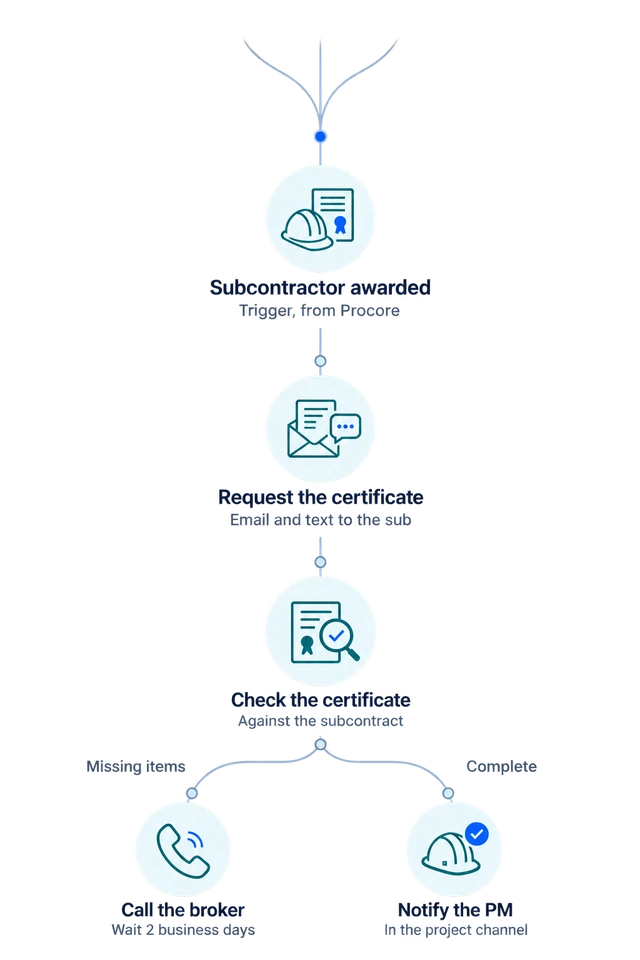
Write a workflow in plain language and approve it. Brody turns it into triggers, conditions, calls, texts, emails, waits and approvals that run on your company number and update your records.
- TriggerA subcontractor is awarded a package in Procore
- ActionRequest the certificate of insurance by email and text
- ConditionCheck it against the subcontract requirements
- Follow upIf anything is missing, call the broker and wait two business days
- ApprovalNotify the project manager in the project channel when accepted
Explore customer call intake, daily field reports, subcontractor document review and payment follow-up.
Built in
Everything else, included. The details that make Brody work on a jobsite.
Keep call records, human approvals and the details behind each conversation connected to the job.
Listen back to any call
Calls are recorded where allowed and filed to the job.
Your name on caller ID
Your company name appears where the recipient’s carrier supports it.
You approve first
Anything with a price or a promise waits for a person.
Voicemail to text
Every voicemail arrives with a transcript.
A full audit trail
Every call, text and record change is logged.
Compared
Other tools answer the phone. Brody finishes the work.
A phone system rings. An answering service takes a message. Brody follows through and records the result.
| What you need | Brody | Typical tools |
|---|---|---|
| Your calls | Answered, routed and acted on, day and night | Menus, voicemail or a message taken |
| Follow up | Brody calls, texts and emails until it is done | Someone on your team has to chase it |
| Your records | Written to Procore, Vista and your systems | Typed in by hand later |
| Your field team | No paid field seats. Calls and texts use company allowances. | Seats and logins for each person |
Integrations
Works inside the systems you already run.
Brody reads projects, people and documents and writes completed work back, so nobody enters anything twice.





Setup, done with you
You are never left on your own. One of our engineers sets it up with your team.
An engineer from Buildalytic sets Brody up with your office, then stays until it runs smoothly on a real job.
Your phone number
Moved and tested.
Your software
Procore, Vista and more.
Your way of working
Set to your rules.
Running smoothly
On a real job.
Built for the field
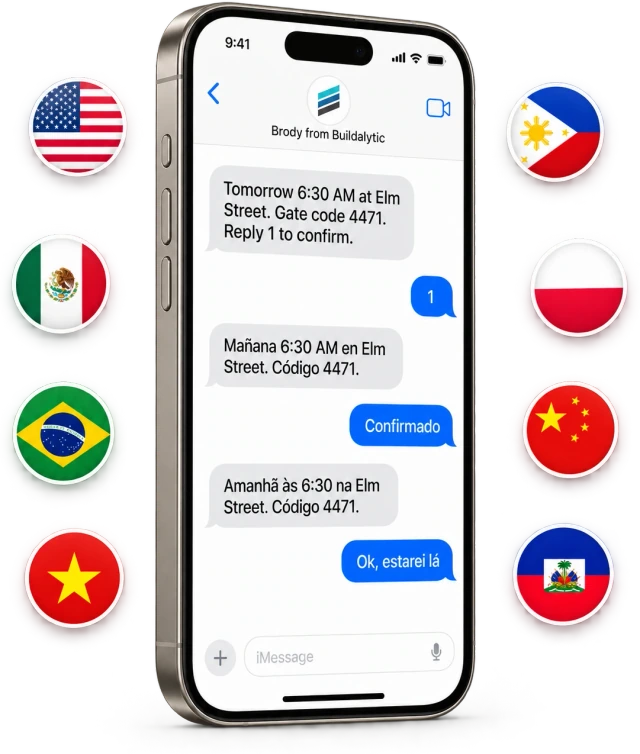
No apps to download. No passwords to forget. Crews answer because it is just a call or a text.
Crews, foremen and subcontractors use their existing phones in their own language, with no paid seats. Calls and texts use company allowances.
Any phone
Ordinary calls and text messages. Nothing to install, nothing to learn.
Phone systemNo paid field seats
No paid seats for workers, subs or suppliers. Calls and texts use company allowances.
Plan detailsEvery language
Each person is reached in the language they prefer, and the record stays in yours.
Languages

Hosted by default. Private options when you need them.
The standard Platform run in the Buildalytic cloud. Dedicated cloud and agreed local AI components are separately scoped Enterprise options. Your records stay yours and never train models for other companies.
Pricing
One full platform.
Pay for the people who operate it. Include crews, subs and customers as free scoped participants. Share usage across your company.
$99
per operating user per month
Or $89 per user per month billed annually
$1,068 per user charged each year
$0 standard setup · One paid user minimum
See full pricing and estimate your billEverything works together.
- Company number and office phone access
- AI calls, texts, connected email and team messaging
- Company knowledge, approvals and released connectors
- Prebuilt and custom workflows using supported actions
Each paid user adds 50 AI calling minutes, 250 messaging units, 250 human US calling minutes and 500 standard AI work items each month. These separate pools are shared across the company, not reserved for individual users.
Standard onboarding is included. Additional usage has published rates and an approved budget. Enterprise requirements and optional engineering are scoped separately.
Trust
Built to be a phone company. Run like one too.
Carrier grade calling and texting, with disclosure, consent and data ownership built into every conversation.
- Disclosure
- Every call names the company Brody represents and states that he is an AI assistant.
- Recording
- Notices and consent follow local requirements, including where every party must consent.
- Messaging
- Registered business texting with instant opt out and quiet hours.
- Caller ID
- Branded caller ID shows your company name where the recipient’s carrier supports it.
- Emergency
- Office lines support emergency calling with dispatchable locations.
- Data
- Your records stay yours, are never sold and never train models for anyone else.
- Control
- Approvals for sensitive actions and a complete audit trail of everything Brody does.
What construction workflows can Buildalytic handle?
Buildalytic connects construction communications, compliance, finance, field reporting and project intelligence. Teams use Brody to capture customer enquiries, qualify and route calls, coordinate crews and suppliers, collect daily reports and photos, follow up on bids and project documents, and keep review tasks moving. Start with one workflow, connect the source records and choose who approves each decision.
What is Buildalytic, and what is Brody?
Buildalytic is the platform your team signs in to, with one company number, a business phone system, team messaging and one shared record for every job. Brody is the AI teammate inside Buildalytic. He answers and makes calls, texts and emails with crews, subcontractors, suppliers and customers in their language, follows up until the work is done and writes the results to Procore, Vista, SharePoint and OneDrive.
Does Brody replace our phone system?
It can. The Platform plan includes a full business phone system with extensions, ring groups, voicemail, calls on existing phones, browser workspace access, team chat and meetings, so you can port your main number from RingCentral or another provider. Many teams start with one workflow and move the main number once they are comfortable.
Will people know they are talking to an AI?
Yes. Every call starts with who Brody is working for, that he is an AI assistant, and that the line is recorded where recording applies. Brody never pretends to be a person.
Can callers reach a real person?
Yes. Callers can ask for a person at any time and Brody transfers them to the right teammate, or takes a message when nobody is available. Your rules decide who gets which calls, after hours handling and what Brody may answer on his own.
What does it cost?
One full Platform plan at $99 per operating user per month, or $89 per user per month billed annually. Start with one paid user. Standard setup is free.
Can crews text job photos to the same number?
Yes. Anyone in the field can text photos, short videos and voice notes to your company number. Brody files each one to the right job and date, captions it, adds it to the daily report and sends it to Procore or your shared folders.
Who owns our data?
You do. Your calls, texts, documents and records stay yours, are never sold, and are never used to train models for other companies. You can run Brody in our cloud, in a private cloud, or with the AI on your own servers.
How do we get started?
Start with a 14 day evaluation on one real project. A forward deployed engineer from our team sets up your number, your jobs, contacts and documents, your first two workflows and team training, so Brody works the way your company already does.
See Buildalytic in action.
See Brody handle your calls, texts and follow-up. Then start with one project, using your number, rules and records.
One full Platform plan. No standard setup fee. Start with one supported workflow.
Plan your rollout
Pricing, security reviews, procurement and rollout across your projects and regions.